IE Opener — A corporate extension that allows you to run IE-only interna
A corporate extension that allows you to run IE-only internal systems and report printing while staying in Chrome tabs. Free for 14 days.
A corporate extension that allows you to run IE-only internal systems and report printing while staying in Chrome tabs. Free for 14 days.
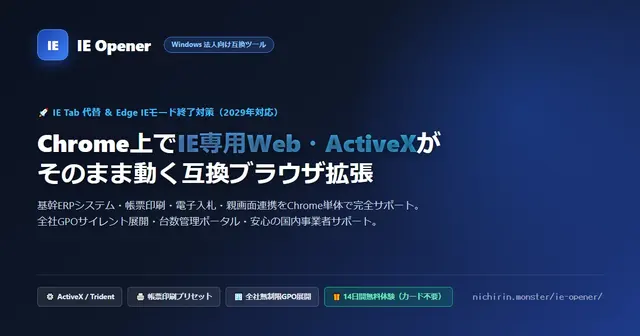
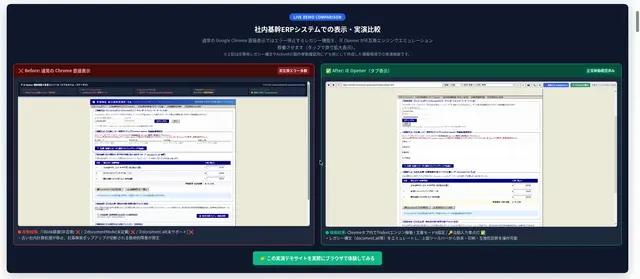
IE Opener is a corporate extension for Google Chrome that allows you to open IE-specific in-house systems and business sites that use ActiveX directly from your usual Google Chrome tabs. By overlaying the Windows standard IE components (Trident/MSHTML) in the Chrome tab display area with matching position and size, you can operate IE-specific screens without switching browsers. For sites already operating in Edge's IE mode, an 'Edge IE Mode External Linkage Mode' helper is also available, which starts Edge in IE mode, and can be switched from the settings screen.
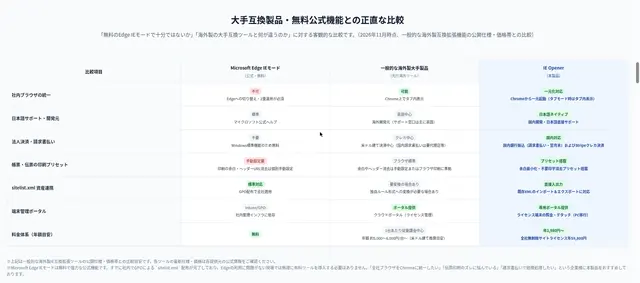
Common issues in the field are addressed as features. It includes document mode specification for IE7-IE11 (FEATURE_BROWSER_EMULATION), recreation of legacy DOM syntax such as ActiveX/COM and document.all, attachEvent, window.event, child screen popups that exchange values with the parent screen (window.opener), print presets for forms and slips (header/footer URL printing removal, 5mm margin, background color printing), bidirectional synchronization of authentication cookies and automatic login input (password encrypted and stored with Windows DPAPI, GPO can disable functions individually), input/output of Enterprise Site List (sitelist.xml), one-click compatibility diagnosis, and PNG capture of the displayed screen.
Prepared for 2029. Microsoft has stated that support for Edge's IE mode will continue until at least 2029. The tab overlay display mode, which directly calls the Trident component on the OS side without going through Edge, is a configuration less affected by the end of Edge's IE mode or changes in its specifications (not applicable if MSHTML itself is removed from Windows in the future). It can be used for both 'prolonging until the transition is complete' and 'business continuity during transition (BCP)'.
Installation work by the IT department is also considered. The extension can be distributed company-wide via Active Directory Group Policy (ExtensionInstallForcelist) or Intune, and the local helper can be set up unattended with /silent. The helper is a pre-built fixed SHA-256 binary, compatible with EDR/AppLocker hash permissions. It can be installed in the general user area without administrator privileges, external communication is limited to license authentication only, and it is designed not to send browsing history or input content externally.
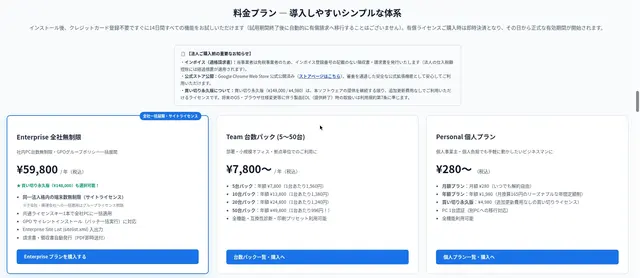
The fee allows you to try all functions for 14 days without registering a credit card (no automatic transition to a paid contract after the trial). Personal monthly 280 yen/annual 1,980 yen/one-time 4,980 yen, Team (5-50 units) annual 7,800 yen to 49,800 yen, Enterprise unlimited for the entire company annual 59,800 yen/one-time 148,000 yen (all tax included). Corporate billing (domestic bank transfer, end of the following month) is also available. First, conduct a 14-day pre-verification on the target system.
Supported OS: Windows 10 / 11 (64bit), Google Chrome 110 or later (macOS / Linux / ChromeOS not supported)
Official website: https://nichirin.monster/ie-opener/server/
Chrome Web Store: https://chromewebstore.google.com/detail/ie-opener/ingmhjfnoaobdppmhjdnmccbmnnibjbo
Inquiries: https://nichirin.monster/ie-opener/server/contact.php / hide7010@hotmail.com
掲載者: H
サービスの基本情報
掲載者が提供した情報です。最新の内容は公式サイトでご確認ください。
- 対応環境
- Web, Windows
- 料金
- 一部無料 · 14日間の無料試用あり(クレジットカード登録不要・試用後の自動課金なし)。Personal 月額280円/年額1,980円/買い切り4,980円、Team(5〜50台)年額7,800円〜49,800円、Enterprise 全社無制限 年額59,800円/買い切り148,000円(税込)。
- 利用登録
- 必要
- 対象ユーザー
- 情報システム部門・社内SE・業務システム担当者。ブラウザはChromeに統一したいがIE専用システムが残っている企業。
- 主な機能
- IE7〜IE11文書モード指定、ActiveX/COM、親画面連携ポップアップ、帳票・伝票の印刷プリセット、認証Cookieの双方向同期とログイン自動入力、sitelist.xml入出力、互換性診断、GPO/Intune一括配布
- 利用例
- IE専用の基幹システム・社内イントラ・帳票印刷をChromeのタブのまま操作。Edge IEモードからの移行や、移行完了までの事業継続(BCP)に。
- 制約・注意点
- Windows 10/11(64bit)とGoogle Chrome 110以降専用(macOS/Linux/ChromeOS非対応)。ICカードリーダーと密結合したシステムや電子入札など、一部のIE専用システムは動作しない場合があります。
- 対応言語
- 日本語
- 情報の確認日
- 2026-11-16
#Chrome拡張機能 #業務効率化 #情シス #IEモード #法人向け #Windows
関連するアプリ・Webサイト
- Woolsong
A website creation service for artists such as musicians, artists, actors, and dancers.
- ほっしーシフトアプリ
I found this! For those who want to manage their shifts and pay together ♡ This shift management app is also convenient for those who work part-time or within the scope of a spouse's income.
- コヨミセ
LINE Reservation System for Small Shops
- ImageSVG
Convert logos and illustrations to high-quality SVGs. Includes a daily free slot.
- StageQ(ステージキュー)|ログイン不要のライブQ&A・リアルタイム投票
It is a free, no-registration, event-specific Q&A tool that combines 'question collection' and'real-time voting' for study sessions and webinars. Participants enter by scanning a QR code or entering a 6-digit code, and post questions anonymously. The 'questions everyone wants to ask' rise to the top through empathy votes (▲).
- jsonl.co
Open 1GB+ JSONL files in your browser. Free, no upload.